
Create Cyso Cloud Account
How to create a Cyso Cloud Account.
To manage your Kubernetes clusters and integrate them with Cyso Cloud, you need to create Cyso application credentials and add them to the Avisi Cloud Console. Follow the steps below to set up the credentials with the required permissions.
Avisi AME currently only supports a Cyso Cloud AMS2.
Create Cyso application credentials
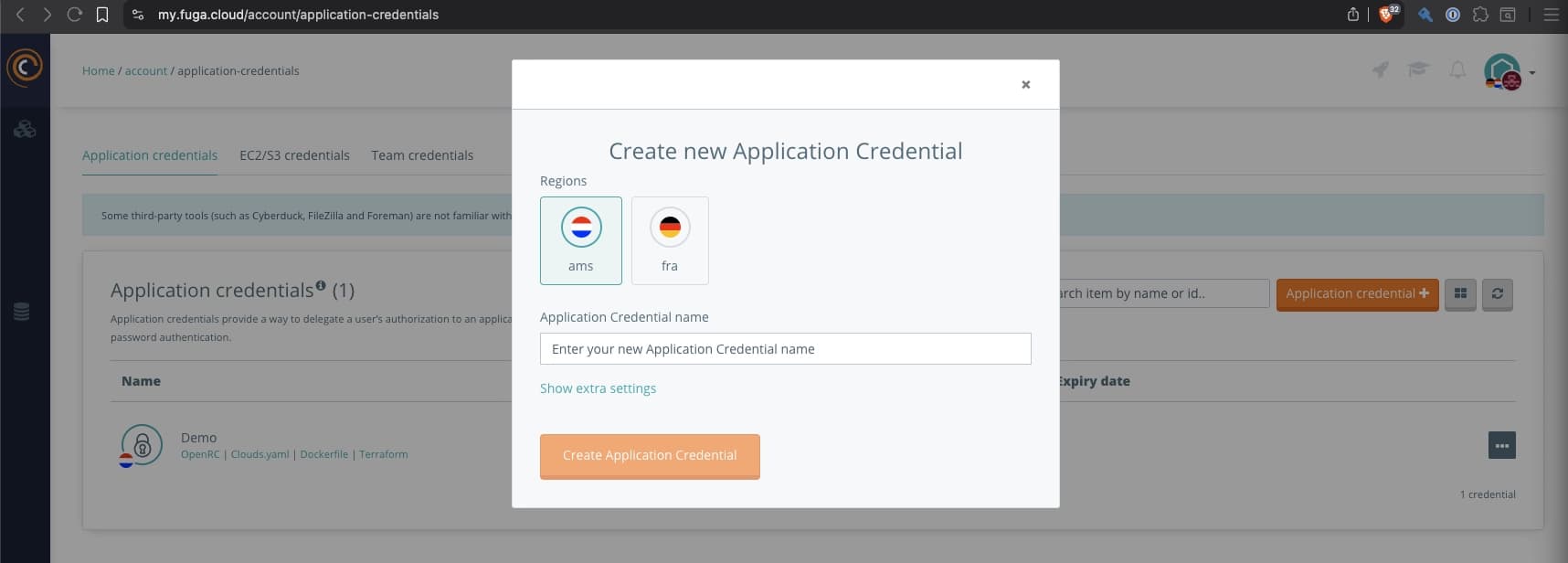
- Switch to the Cyso Cloud team where you want to provision resources with Avisi AME.
- Navigate to
Application credentialsand selectApplication credential +. - Select the region
amsfor Cyso Cloud AMS2 - Enter a descriptive
Application Credential Name. - Keep the
IDandSecretvisible and save them for the next section.
Create a Cyso Cloud account in the Console
Now we can create a cloud account within the Console. In the side bar in the Console, select Cloud Account. Next click the button Add cloud account.
- Select
Cyso Cloud AMS2as the cloud provider. - Name the cloud account after the Cyso Cloud team for clarity.
- Leave
Project IDempty. - Select
Create.
Create Cyso Cloud credentials in the Console
- Go to the Cyso cloud account details screen.
- Click the button
Add cloud credentials. - Enter a descriptive name. We recommend using the same name as the Cyso application credentials.
- Paste the
IDandSecretvalues from the previous section into the OpenStack credentials form. - Select
Create OpenStack credentials.
The credentials are validated when you create them and are only saved if validation succeeds. After saving the credentials, you can use this cloud account for new clusters.